
Field technique · Digiscoping
How to digiscope with a phone
A practical phone digiscoping sequence for birdwatchers: stable support, eyepiece alignment, focus, exposure and common black-ring fixes.
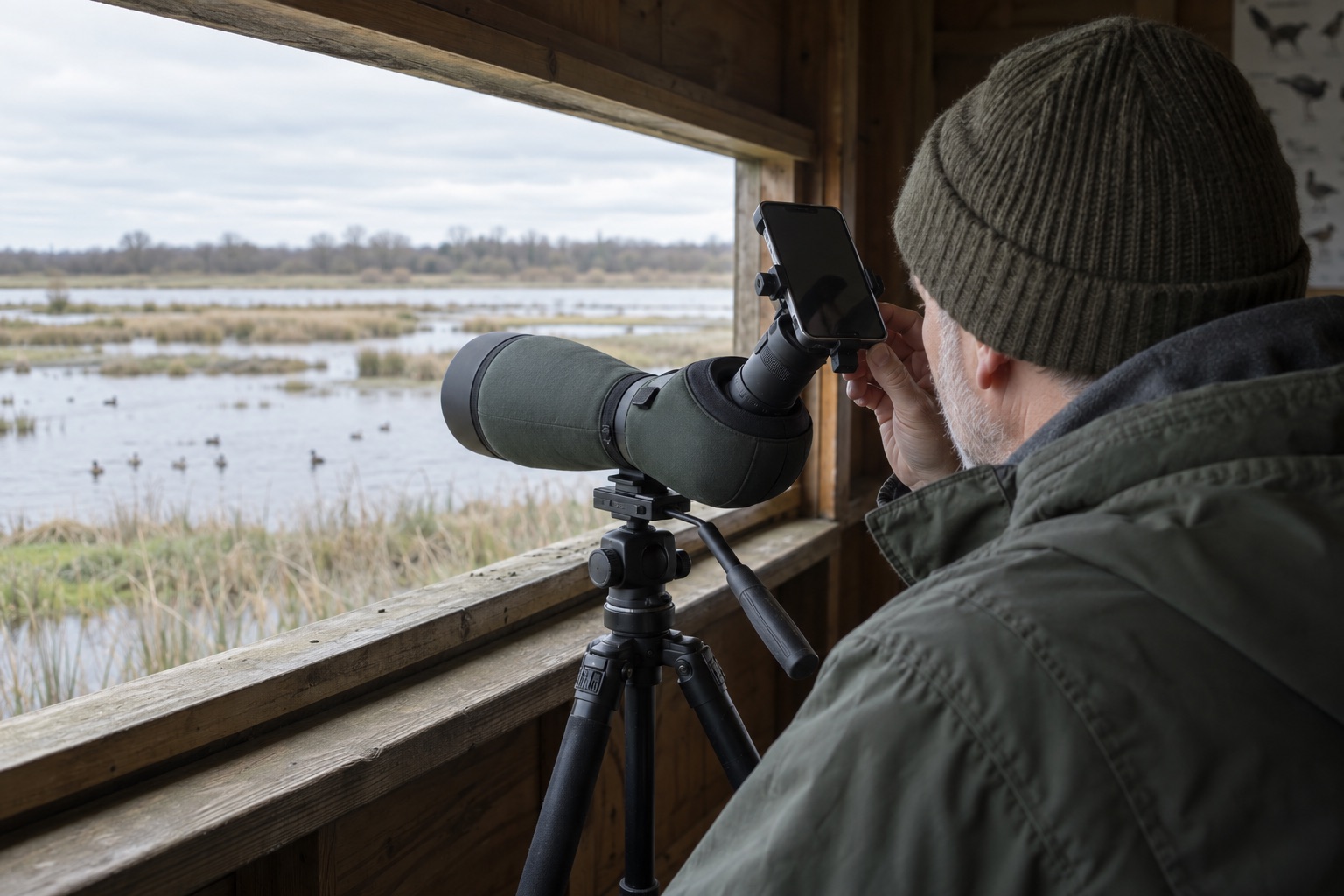
Choose a stationary or slow-moving subject for your first attempts.
Align the correct phone lens; multi-camera phones can switch lenses unexpectedly.
Keep wildlife at a respectful distance and never point optics at the Sun.
Digiscoping means photographing through a spotting scope with a camera, often a phone. It can record a distant bird for later identification or share an observation with someone who was not in the hide. The phone does not create extra optical resolution: a steady, well-focused scope view is the foundation of a useful image.
1. Build a settled viewing position
Put the tripod on firm ground or a stable hide floor. Keep the centre column low where possible, tighten the scope's mounting plate and choose a stationary subject to practise on. If pressing the focus wheel makes the image wobble for several seconds, fix the support before attaching the phone. A smooth tripod head makes small framing adjustments less abrupt.
2. Find and focus by eye
Find the bird with binoculars, transfer to the scope at its lowest zoom, and focus through the eyepiece with your eye. Centre the subject. A bright, broad view makes phone alignment much easier than trying to attach the phone while the scope is at 60×. If the image ripples across a distant shore, pause or lower power; our heat-haze guide explains why refocusing will not fix moving air.
3. Fit and align the adapter
Before the field trip, check that the adapter grips the outside of your eyepiece and that its phone clamp fits your phone, including its case if you will leave it on. Our phone-adapter comparison lists measured ranges for two examples. Attach the adapter securely without forcing the eyecup or interfering with a zoom ring. Place the phone so its main camera lens faces the centre of the eyepiece. Open the camera app and adjust side-to-side, up/down and, if supported, in/out distance until the bright circle is evenly centred. Do not let a loose phone dangle from the eyepiece.
4. Take the image without adding shake
Tap the subject on the phone display to set focus and exposure if your camera allows it. Bright sky behind a dark bird may need exposure adjustment; take a few variations rather than trusting one automatic setting. Use a two- or three-second timer, remote shutter or short video clip to avoid moving the rig when you touch the screen. Review the image at full size. If it is soft, check scope focus, vibration and air shimmer before adding zoom. Mild cropping of the field edge is normal; heavy digital zoom rarely creates new detail.
Common failures, and the next adjustment
A dark crescent or black ring means the camera is off-axis or at an unhelpful distance. A tiny bright disc can also mean the phone lens is too far from the eyepiece. Sudden framing changes may be the phone switching rear lenses. A clear centre with moving, wavy edges suggests atmosphere rather than the adapter. A sharp live view but blurred saved frame often points to touch-induced movement—use the timer. Change one variable at a time so you know what helped.
Photographs are secondary to the bird's welfare. Remain in designated viewing areas, avoid playing calls or approaching nests to fill the frame, and stop if your presence changes feeding or resting behaviour. Never aim a scope, adapter or phone setup at or near the Sun without properly designed solar equipment and expert procedure; an ordinary spotting scope is unsafe for solar viewing.
Helpful products
An adjustable adapter example
The NexYZ 81055 offers X/Y/Z adjustment for centring a compatible phone behind a compatible eyepiece. Measure both clamps first; the technique below also applies to other suitable adapters.

Celestron NexYZ 81055 three-axis phone adapter
Best for: Repeatable phone positioning
An X/Y/Z-adjustable smartphone-to-eyepiece mount that helps position a phone camera and set its distance from the scope's eyepiece.
What stands out
- X, Y and Z adjustments
- 35–60mm standard eyepiece clamp range
- Phone clamp spans 65–90mm
Keep in mind
- Check phone case thickness and eyepiece shape
- At 283g it adds weight behind the eyepiece
- 35–60mm eyepiece clamp
- 65–90mm phone clamp
- 283g
- Three-axis adjustment
Frequently asked questions
Digiscoping questions
Why is there a black ring around my digiscoped image?
The phone camera is seeing the edge of the eyepiece field. Centre the correct lens, adjust camera-to-eyepiece distance and try low scope power first. Some cropping may remain.
Should I zoom the scope or the phone?
Start with low optical scope power for a bright, stable image. Increase it only while real detail improves. Digital phone zoom usually crops pixels and will not recover detail lost to shake or haze.
Why does my phone keep changing cameras?
Some phones switch between rear lenses automatically. If your camera app permits it, select or lock the main lens; otherwise check which lens is active and realign the adapter.
Can I digiscope birds without disturbing them?
Yes, if you stay at an appropriate distance, keep to permitted paths and hides, and stop if the bird changes behaviour. Do not approach nests or sensitive wildlife for a closer image.