
Field technique · Photography
How to take photos through binoculars
A practical binocular phone-photography method: stable mount, one eyepiece, camera alignment, focus, exposure and troubleshooting.
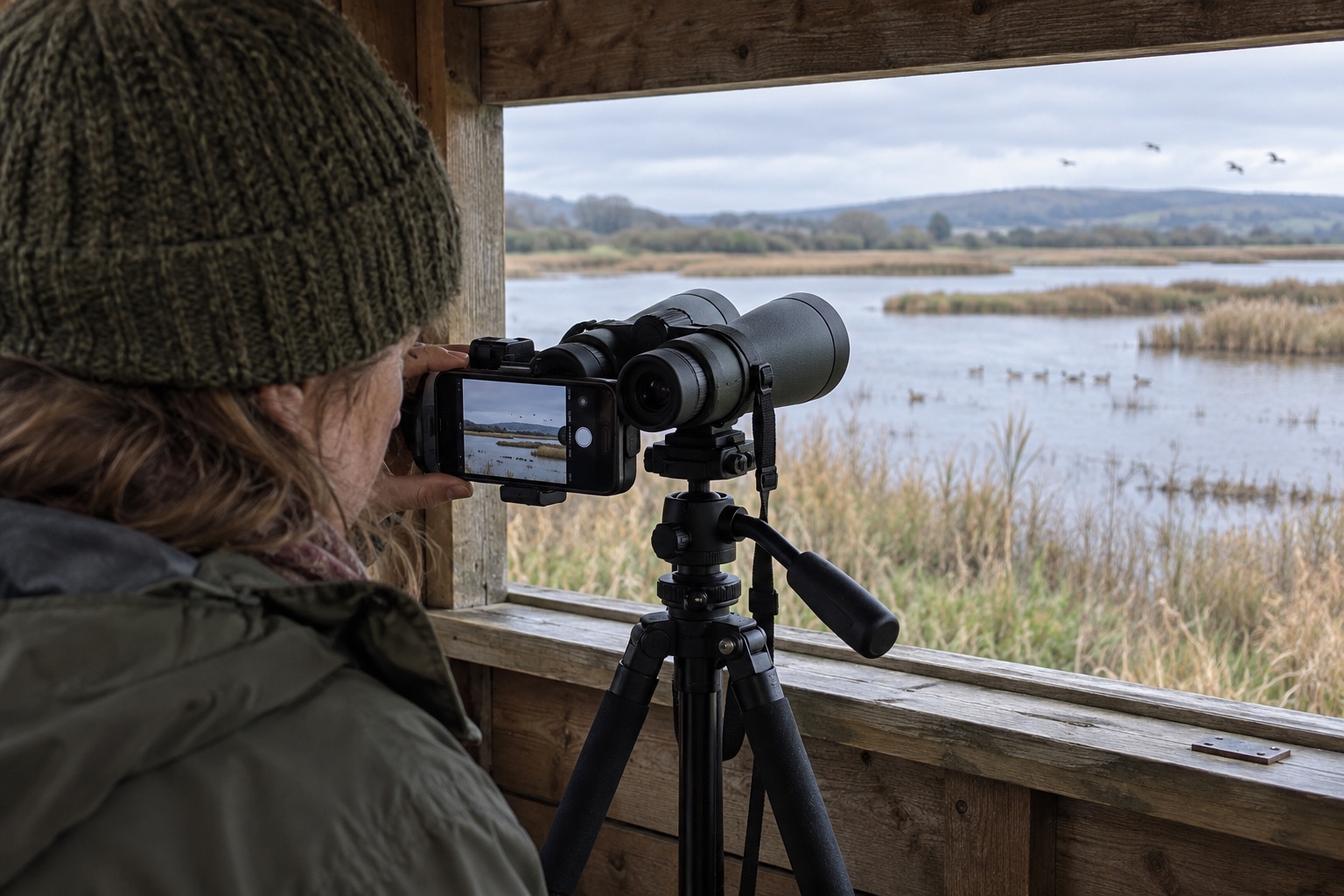
Practise on a stationary distant object before photographing wildlife.
Keep the phone's weight off loose eyecups and check the mount balance.
Never point ordinary binoculars or a phone adapter at the Sun.
Photographing through binoculars can capture an identification record or a memory, but it is more fiddly than ordinary handheld observation. The two barrels are for your eyes; the phone uses one eyepiece. Treat it as a small digiscoping setup. The binocular image must already be clear and steady before a phone can record it.
1. Settle the binocular
For a first attempt, use a stationary sign, branch or distant building in daylight. If your binocular has a front-hinge tripod socket, attach a compatible binocular adapter and tripod. Lock the plate and check that the binocular does not rotate when you touch focus. Some compact binoculars cannot be tripod-mounted; brace them against a stable support, but do not risk a drop by balancing them on a ledge. Avoid a windy deck or moving vehicle.
2. Focus by eye and position the phone
Find and focus the target normally before attaching the phone. Use a low magnification if you have a zoom binocular. A purpose-made phone adapter clamps behind one eyepiece; measure its grip range and phone width first. Keep its weight on a firm mount rather than a loose rubber eyecup. Open the phone camera and identify the active main rear lens. Place that lens centrally over the eyepiece, then adjust side-to-side, up/down and distance until the bright circle is even. On a multi-camera phone, a switch to another lens can suddenly destroy alignment.
3. Expose and release without shake
Tap the subject on screen to focus and set exposure if the camera permits it. Against bright sky, a dark bird may need an exposure adjustment. Use a two- or three-second timer or remote shutter to avoid moving the rig when tapping. Take several frames; a short video can help with a moving bird, though each frame may be lower quality. Review sharpness at full size before increasing any zoom. Digital enlargement mainly crops pixels.
Troubleshoot one variable at a time
A black crescent means off-axis alignment; a small bright disc often means the phone lens is too far from the eyepiece. A sharp live view but blurred saved image suggests shutter-touch movement or a moving subject. Wavy distant detail can be heat haze, which refocusing cannot cure. If the image remains dark, check whether the phone selected a different rear lens.
Wildlife welfare comes before a larger frame. Stay on permitted paths or in hides, do not approach nests, and stop if a bird changes behaviour. Never aim binoculars at the Sun: the concentrated light can damage eyes and equipment.
Helpful products
One measured-fit adapter example
NexGO 81036 may suit eyepieces measuring 25.4–44.45mm outside diameter and phones 58–103mm wide. Measure your own setup; the technique works with other compatible adapters.

Celestron NexGO 81036 two-axis phone adapter
Best for: Smaller compatible eyepieces
A folding X/Y-adjustable smartphone-to-eyepiece mount suited to smaller-diameter eyepieces within the maker's stated clamp range.
What stands out
- X and Y alignment controls
- Folds for transport
- Phone clamp spans 58–103mm
Keep in mind
- 25.4–44.45mm eyepiece clamp excludes some wide eyepieces
- No independent Z-axis adjustment
- 25.4–44.45mm eyepiece clamp
- 58–103mm phone clamp
- Two-axis adjustment
- Folding body
Frequently asked questions
Binocular photography questions
Can I take a photo through binoculars without an adapter?
Yes for an occasional record shot, but holding binoculars and a phone in alignment is difficult. Rest or mount the binocular, then brace the phone carefully without pressing the eyepiece.
Why is there a black circle or crescent?
The active phone lens is off-centre or the camera-to-eyepiece distance is wrong. Re-centre the lens, try a lower camera zoom and adjust spacing.
Should I use the phone's digital zoom?
Only sparingly to crop dark edges. Digital zoom cannot recover detail lost to binocular shake, poor focus or heat haze.
Why does the phone change lenses?
Some multi-camera phones switch lenses automatically. If possible lock the main lens in the camera app, or check which lens is active and realign.